This guide sets out the current Odoo plans in Australian dollars, explains exactly what each plan includes and excludes, works through the licence maths for a typical 10-user business, and then covers the costs the pricing page doesn't show. It's written by WAO Group, an Australian Odoo partner led by accountants, so the focus is on what the numbers mean for your budget, not just what they are.
Prices in this article are in AUD, excluding GST, as listed by Odoo for Australia in October 2026. Odoo changes its pricing from time to time, so always confirm on odoo.com/pricing before you sign. Updated 19 October 2026 for Odoo’s September 2026 price announcement and the new light-user licence.
How Much Does Odoo Cost in Australia?
For most Australian businesses implementing Odoo properly, the licence cost is A$80 per user per month on the Custom plan, billed annually, or A$43 per user per month on the Standard plan, billed annually. Odoo discounts the first 12 months (A$64 and A$34.40 respectively), and charges more if you pay monthly instead of annually. There is also a One App Free plan that costs nothing.
- Hosting, if you choose Odoo.sh or your own servers rather than Odoo Online.
- Implementation — configuration, data migration, training and project management.
- Third party apps from the Odoo App Store, if you need them.
- Ongoing support and upgrades, especially if you have custom modules.
The rest of this guide breaks each of those down.
What Odoo Pricing Plans are Available?
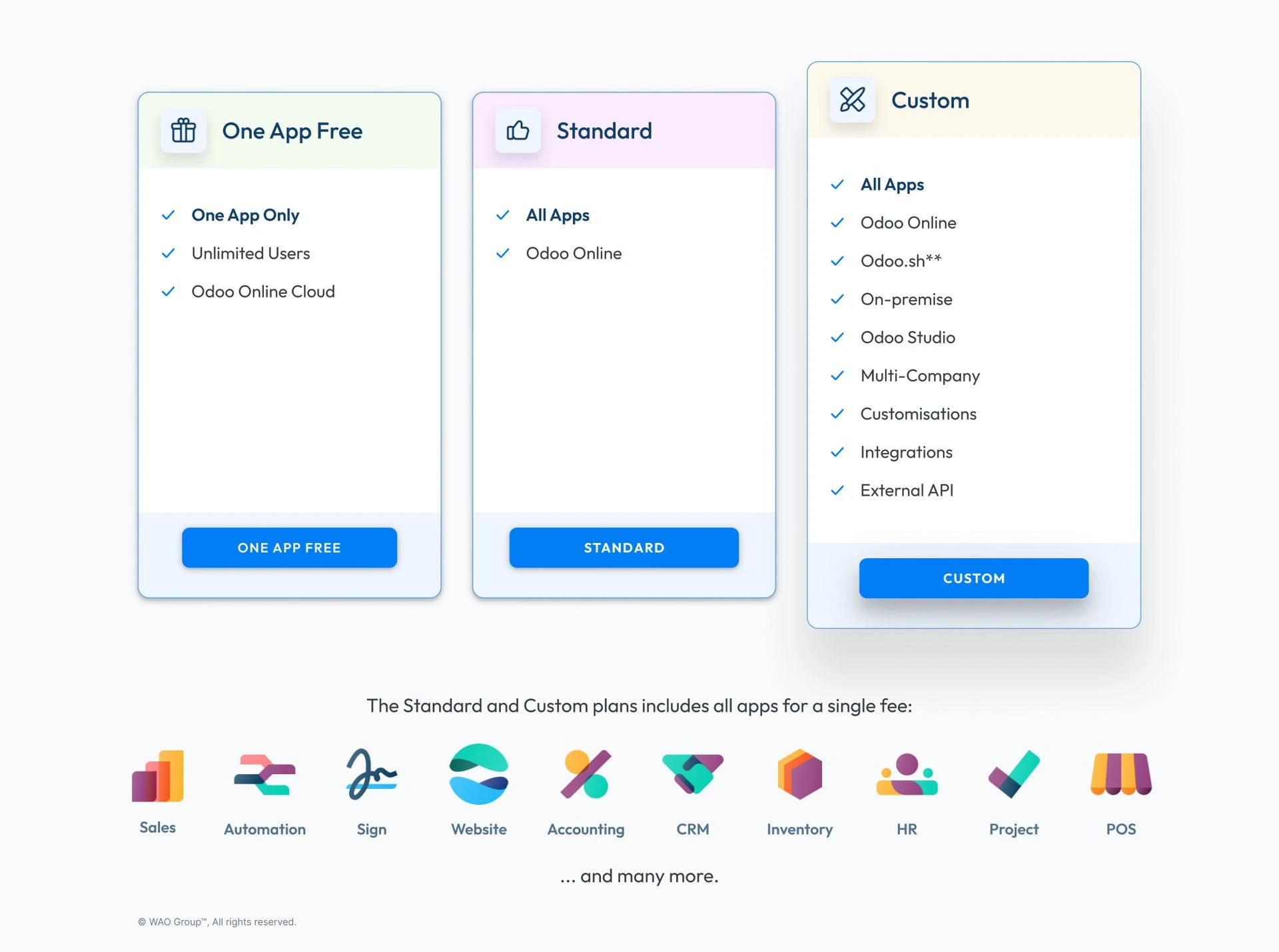
Odoo sells three plans. The difference between them is less about which apps you get and more about how much you can change, connect and host.
One App Free
The one app free plan gives you unlimited users on a single Odoo app — for example, just CRM, or just Invoicing — hosted on Odoo Online. There is no licence fee. It's genuinely useful for testing how Odoo works, or for a business that only needs one tool. The moment you add a second app, you move onto a paid plan and every paying user is charged.
Standard plan
The standard plan gives you access to all Odoo apps — accounting, inventory, sales, CRM, manufacturing, website, ecommerce and more — hosted on Odoo Online.
What it doesn't include is the ability to customise Odoo beyond its standard settings. There is no Odoo Studio, no custom modules, and no external API. That last point matters more than most people expect: without the API, you can't connect Odoo to a Shopify store, a 3PL warehouse, a payroll provider or any system outside Odoo's own apps.
Custom plan
The custom plan includes everything in Standard, plus:
- Odoo Studio, the no-code tool to add fields, screens and automations.
- External API access, so Odoo can talk to other software.
- Custom modules and custom code, hosted on Odoo.sh or on premise.
- Multiple companies in a single database.
When we choose custom for a client, it's almost always because of the API or multi-company requirement, not Studio. Most Australian businesses of 10+ users that are replacing Xero or MYOB plus several add-ons end up on Custom.
Odoo Pricing Table (AUD, Per User Per Month, ex GST)
Plan | Annual billing, first 12 months | Annual billing, from month 13 | Monthly billing, first 12 months | Monthly billing, from month 13 |
One App Free | A$0 | A$0 | A$0 | A$0 |
Standard | A$34.40 | A$43.00 | A$43.20 | A$54.00 |
Custom | A$64.00 | A$80.00 | A$80.00 | A$100.00 |
Two things to notice. First, the prices you see advertised are the first-year discounted, billed annually figures — budget for the month-13 price, because that is what you'll pay every year after. Second, paying monthly costs roughly 25% more than paying annually for the same plan.
How Much Does Odoo Cost Per User? A 10-User Worked Example
Here's the licence maths for a 10-user business, billed annually. These are simple multiplications from the table above.
Standard plan | Custom plan | |
Year 1 (discounted) | 10 × A$34.40 × 12 = A$4,128 | 10 × A$64 × 12 = A$7,680 |
Year 2 onwards | 10 × A$43 × 12 = A$5,160 | 10 × A$80 × 12 = A$9,600 |
For a quick comparison against what you pay today, use A$960 per user per year for Custom and A$516 per user per year for Standard. Then add up your current subscriptions — accounting, inventory, CRM, payroll, ecommerce connectors, reporting tools — per user. Because one Odoo licence covers every app, it often replaces several separate subscriptions — so compare totals, not per-app prices.
Who counts as a paying user?
Only internal users who log in to the Odoo backend are paying users. Customers using your website or customer portal, and suppliers accessing a portal, are not charged. Your initial users are usually the people doing the work — accounts, sales, warehouse, purchasing. Staff who only need to submit timesheets or expenses still need a licence, although from Odoo 20 some of them may qualify for the cheaper light-user licence (see below). Plan your user list carefully before you commit.
What changed in Odoo’s 2026 pricing?
On 24 September 2026, at the launch of Odoo 20, Odoo announced its first price rise in four years: about 20% on some plans, to cover higher salary and hosting costs. Using a single app stays free.
Odoo also introduced a light user: a cheaper licence for staff who only need a narrow part of Odoo. In Australia a light user costs A$12.90 per user per month, excluding GST, compared with A$43 for a full Standard user and A$80 for a full Custom user. It is only available when you have at least one full user. Odoo’s pricing page sets out which roles qualify, so check your user list against it before you count anyone as light.
What this means for your budget:
- The AUD figures in the table above are the prices Odoo listed for Australia in October 2026. Use them, not older quotes, when you compare.
- Before you ask for a quote, split your user list into full users and people who only need a narrow slice of the system. The saving comes from staff who never touch accounting, purchasing or sales.
- If you are renewing an existing subscription, check your renewal quote against the current list price before you sign.
Is Odoo Free?
Partly. There are two ways to use Odoo without a licence fee:
- One App Free — one app, unlimited users, on Odoo Online.
- Odoo Community — the open-source edition, free to download and self-host.
Odoo Community is free for life, but it is not the same product as Odoo Enterprise. Community lacks several apps and features Australian businesses rely on, including the full accounting localisation, payroll and Studio. You also carry every hosting, security and upgrade cost yourself. For a business running its finances on Odoo, "free" Community often ends up costing more than an Enterprise licence once you pay someone to maintain it.
So Odoo is free to try, and free in a narrow sense, but a business running accounting, inventory and sales across a team will pay for Enterprise.
Odoo Online vs Odoo.sh vs on Premise: How Does Hosting Change the Cost?
Hosting is the first of the costs that changes your Odoo cost beyond the licence.
Odoo Online hosting is included in both the Standard and Custom plans. Odoo runs the servers, applies updates and handles security. You can't install custom code, but for businesses that don't need custom modules it's the simplest and cheapest option. Storage is included up to a limit, with an extra fee beyond it.
Odoo.sh is Odoo's own cloud platform for businesses on the Custom plan who need custom modules. It's charged separately from the licence, based on the server capacity, storage and number of production branches and staging environments you need. It suits businesses with custom development or significant integrations.
On premise (or your own cloud server) is available on the Custom plan. There's no Odoo hosting fee, but you pay for the infrastructure, backups, security and the technical work to maintain it. It rarely saves money for Australian SMEs, and we usually only recommend it where there's a specific data-sovereignty or integration reason.
What are the Hidden Costs of Odoo?
These aren't hidden so much as not on the pricing page. They're where most Odoo budgets go wrong.
Implementation and configuration
Odoo is powerful because it's configurable, and someone has to configure Odoo for your business: chart of accounts, GST and BAS setup, inventory rules, approval workflows, reports. None of this is in the licence. For a clear breakdown of what implementation typically involves in Australia, see our guide to ERP implementation cost in Australia.
Data migration
Moving customers, suppliers, products, open invoices and opening balances out of Xero, MYOB or a legacy system takes planning and checking. The quality of your data migration decides whether your first month-end in Odoo reconciles.
Training
Your team needs to learn new screens and, often, new ways of working. Budget time for role-based training for accounts, sales, warehouse and purchasing, and for a few weeks of support after go-live, when the real questions arrive.
Custom development and maintenance
Every piece of custom code has to be maintained and tested through each Odoo upgrade. Before you pay for custom development, check whether standard Odoo or Studio can do the job. When integrations genuinely are needed, see how we approach Odoo integrations and custom development.
Third party apps
The Odoo App Store has thousands of third party apps. Some are free; many carry a one-off fee, and each one needs to be kept compatible with future versions.
Success Packs
Odoo sells prepaid blocks of implementation hours, called a Success Pack, directly and through partners. At WAO Group we bill implementation on time rather than prepaid packs, with a fixed-price scoping stage — the Odoo Success Blueprint — so you know the plan and the estimate before any build starts.
How Much Does it Cost to Implement Odoo?
It depends on the number of apps, the number of users, how clean your data is and how much integration you need. A single-company business moving accounting, inventory and sales off Xero is a very different project from a multi-entity manufacturer with ecommerce and 3PL integrations.
What we can say plainly: in the projects we scope, implementation is usually a bigger line in the first-year budget than the licence, and it's the part of the budget that decides whether the project succeeds. The cheapest implementation quote is rarely the cheapest outcome — rework after go-live costs more than getting the accounting setup right the first time.
Not Sure If Odoo is Right For Your Business?
We'll look at your users, apps and integrations and tell you which plan you need.
Which Odoo Plan Should an Australian Business Choose?
Use this as a starting point:
- One App Free — you only need one tool (for example CRM or invoicing) and want to test Odoo.
- Standard — you want accounting, inventory, sales and CRM in one system, you don't need to connect Odoo to outside software, and standard workflows fit how you operate.
- Custom — you need to connect Odoo to ecommerce, a 3PL, EDI or other platforms; you run multiple companies; or you need custom modules or Studio.
If you're a wholesaler or manufacturer, you'll almost certainly need Custom for integrations and multi-step inventory. See how Odoo works for manufacturing and inventory and for wholesale distribution.
One caution: moving from Standard to Custom later is straightforward, but designing your processes around Standard's limits and then discovering you need the API is not. Decide on the plan after you've mapped your processes, not before.
What are the Disadvantages of Odoo?
A fair answer, from a partner that implements it:
- Per-user licensing adds up as you grow, especially if many staff only need occasional access. Odoo’s new light-user licence (2026) eases this for some roles.
- The Standard plan can't integrate with outside software, which surprises businesses that assumed "all apps" meant "everything".
- Implementation is the real cost, and a poor implementation is expensive to fix.
- Heavy customisation increases upgrade cost over the life of the system.
- Australian specifics need setting up properly — GST, BAS, payroll and Single Touch Payroll aren't "switch on and go".
None of these rule Odoo out. They're the reasons to plan the project properly.
How Does WAO Group Help with Odoo Cost?
In practice that means we'll tell you which plan you actually need, whether Standard will do, and where custom development is and isn't worth paying for. After go-live, our Odoo Support team keeps your system and upgrades on track.
Frequently Asked Questions About Odoo Pricing
On annual billing, Odoo costs A$43 per user per month on Standard and A$80 per user per month on Custom, excluding GST, after the first-year discount ends. Monthly billing is A$54 and A$100 respectively.
The One App Free plan and Odoo Community are free with no time limit. One App Free is limited to a single app; Community is the open-source edition without Enterprise features such as the full Australian accounting localisation and payroll.
Yes. On the Custom plan, you can host Odoo Enterprise on your own servers or on Odoo.sh. Odoo Community can also be self-hosted for free, but you carry all hosting, security and upgrade costs.
Odoo makes money from Enterprise subscriptions, Odoo.sh hosting, and implementation services sold directly and through its partner network.
Odoo is an ERP. CRM is one of its apps, alongside accounting, inventory, manufacturing, sales, purchasing, website, ecommerce, HR and more — all in a single database.
Yes. Odoo has an Australian accounting localisation covering GST and BAS, Australian payroll, and AUD pricing. It's supported locally by Odoo partners including WAO Group. See our guide to Odoo payroll in Australia.
No. The licence covers software access and, on Odoo Online, hosting. Implementation, data migration, training and custom development are separate.
It depends on scope. For businesses needing accounting, inventory and operations in one system, Odoo is usually the stronger fit. We compare the two in detail in Odoo vs Zoho.
Ready to Find Out What Odoo Would Cost for Your Business?
We'll look at your users, apps and integrations and tell you which plan you need.
The information and tips shared on this blog are meant to be used as learning and personal development tools as you launch, run and grow your business. While a good place to start, these articles should not take the place of personalised advice from professionals. As our lawyers would say: “All content on WAO’s blog is intended for informational purposes only. It should not be considered legal or financial advice.” Additionally, WAO is the legal copyright holder of all materials on the blog, and others cannot re-use or publish it without our written consent.